





How do you call on students in class? I use a spreadsheet and the =rand() formula.
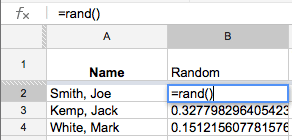
- Create spreadsheet with student names
- In the column next to their name write the formula =rand()
- Sort the sheet by the random number and a random student will float to the top.

Since each time you sort the sheet it reassigns a NEW random number you can continue to sort by the random number column to continuously call on students randomly.
Bonus:
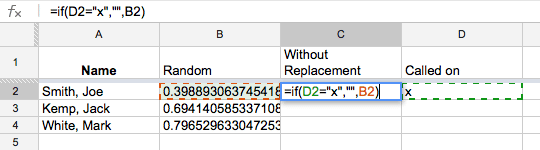
- Create a 3rd column (C) “without replacement”
- Create a 4th column (D) “Called on”
- Each time you call on a student mark them off with an x in the “Called on” column.
- In the “without replacement” column type this formula
=if(D2=”x”,””,B2)
Which states that if there is an x in the “called on” column put nothing in the “without replacement” column, otherwise insert the random number. - Sort the sheet by the “without replacement” column.
- Any student who has been marked with an x in the “called on” column will sink to the bottom so they will not be called on again.
If you would like a template of this click here.









2 thoughts on “Random Student Chooser”
This is great Alice, thanks a bunch for sharing!
I followed the steps carefully, but formula seems to not always work for me. For some reason, students with an “x” show up before everybody has been picked, even though they have an “x” in “called on” column…
I wonder what I missed or did wrong…. Any thoughts?
Hmmm, hard to tell. You can share me on the spreadsheet and I can look at it.