






Want to learn how to search Google Drive? I am presenting at the NJECC Conference in January. I thought I would use this as a chance to try out gamified Professional Development. One of my sessions is on “Searching Google Drive.” For this I utilized the template I posted earlier for having PD participants level up and earn badges.
The Template
Click Here to view a copy of the game template.
Searching Google Drive
I have listed some challenges (tasks) for searching your Google Drive. As you complete the tasks you will want to place an X in the left hand column. This should allow you to LEVEL up as you complete the challenges.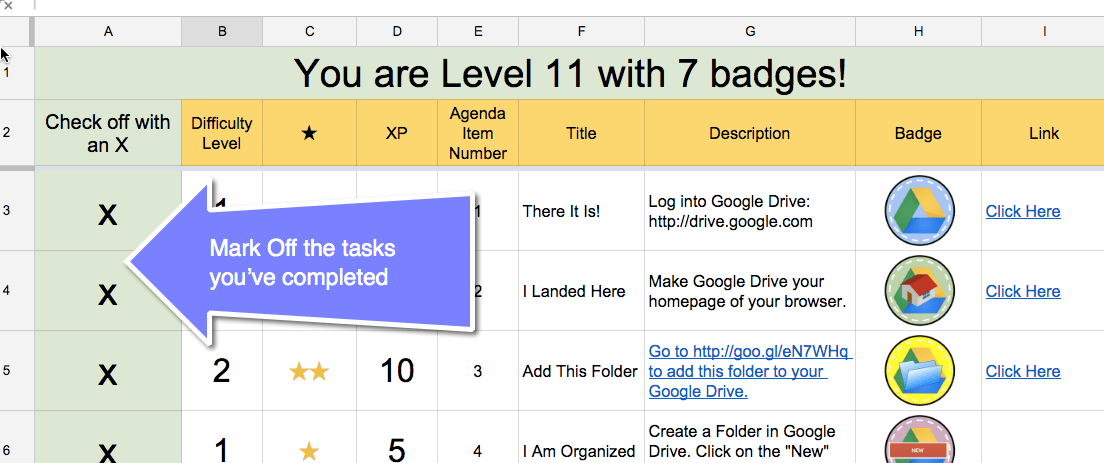
Badge Display
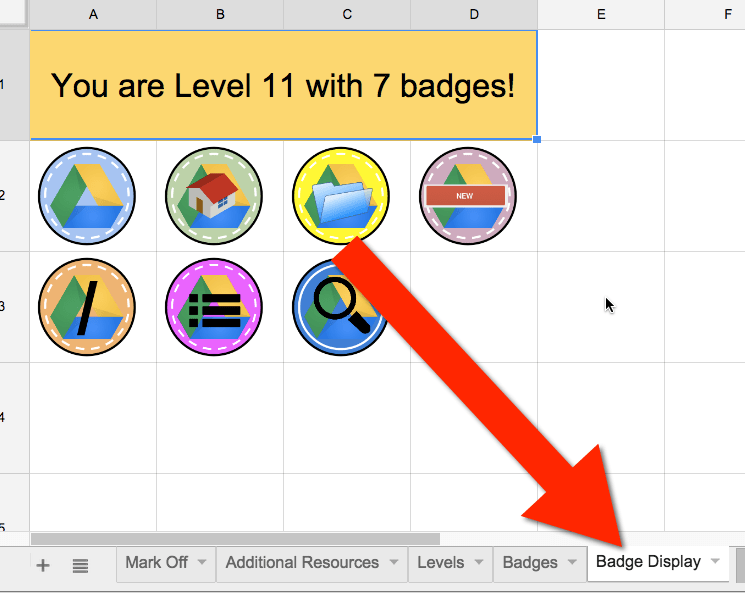
Look at the bottom of the spreadsheet for the “Badge Display” tab. This will show you the badges you earned completing the tasks. You can print this page if you wish.
Presentation
Please Link to My Resources
NOTE: Please do not publish my templates to your blog. Linking to my blog posts is always appreciated.
Feel free to utilize the PD generic template or my searching Google Drive gamified PD spreadsheet when providing your own Professional Development workshops or when creating activities with students. Credit is always appreciated.






3 thoughts on “Gamify Searching Google Drive”
Brilliant Alice!
Thank you Phillip!
Fantastic work on Gamification. I tweaked the Template slightly so that (1) the difficulty level (1,2,3) automatically assigns an XP point value (5,10,15) and that (2) the XP total is displayed. This modified version is here. https://docs.google.com/spreadsheets/d/1wRnzZobHapA4Bt1wCI2t1cHvcoB5poWAhR23m-U4Ny4/copy