



Teaching Math with Google Apps
I have been 1:1 almost my entire teaching career. When asked “can you use technology to teach math?,” I do not know how to teach math WITHOUT technology.
[tweet]Using technology is a shift in thinking.[/tweet]
The wrong question is “How do I do exactly what I was doing before?”
[tweet]Use technology to interact better with students.[/tweet]
July 29th Workshop
Join Diana Herrington and myself on July 29th in Garland Texas for our “Teaching Math with Google Apps” workshop. Register on Eventbrite.
Google Apps
One thing Diana and I encourage is using Google Slides …. a lot. Google Slides are essentially blank sheets of paper, you can do almost anything with Google Slides.
Go Slower and Deeper
Stanford math professor, Jo Boaler, in her book, “Mathematical Mindsets,” states that doing a bunch of the same type of problem is not that helpful. While it seems counter-intuitive, rote practice does not help students to have a deeper understanding of mathematics concepts or to love math.
One thing that Diana Herrington does is has her students use blank Google Slides and for the students to choose THREE math problems. The students then need to model their thinking in the slides. Using Slides forces students to SLOW DOWN and THINK about their math.
Move to Conversations
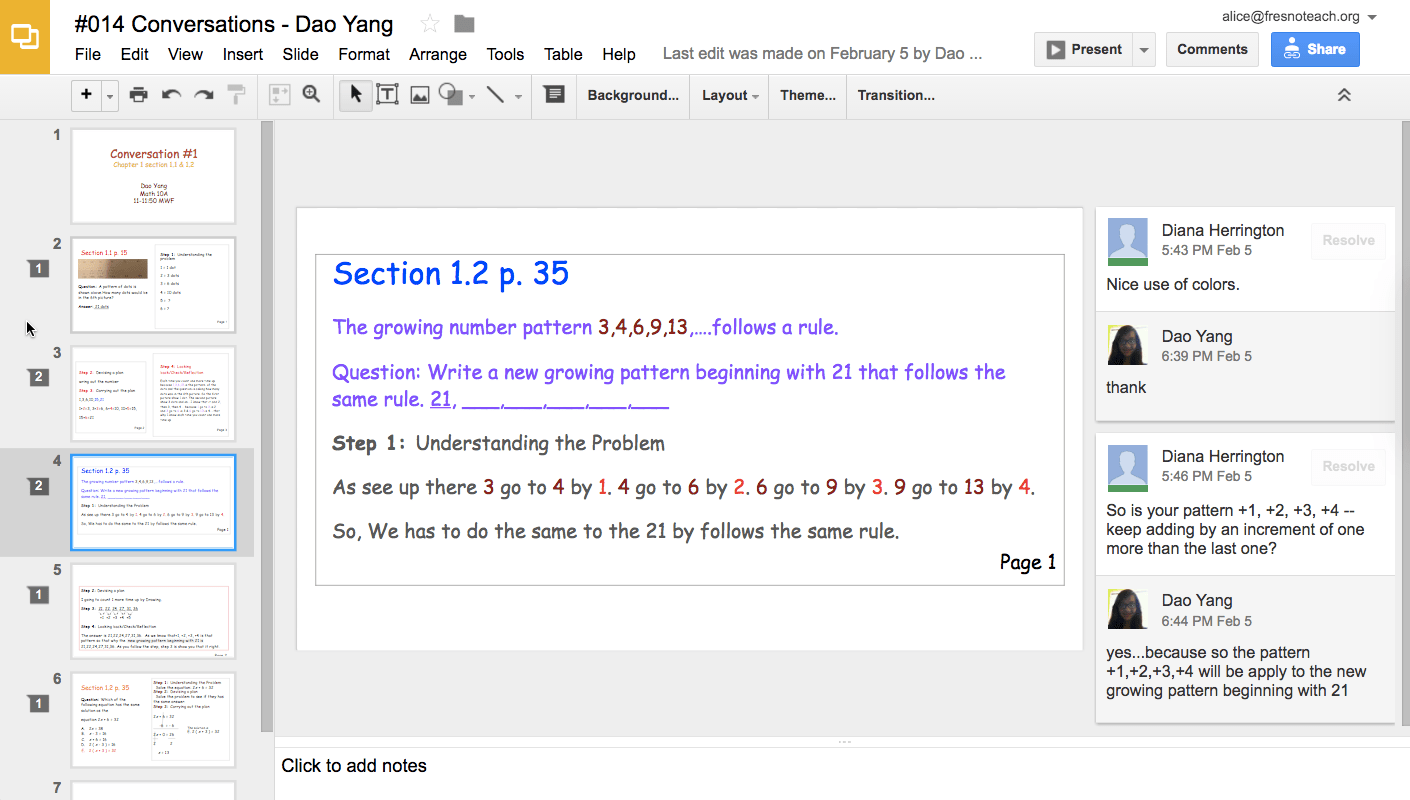
She then asks students to have a CONVERSATIONS with her about their math. The assessment is not on the student getting the right answer, but instead that they engage in a conversation with her about math. For students to increase their critical thinking and understanding of math topics, they need to receive feedback and questions that further their thinking.
Google Slides is perfect for this. You can select elements of what the student has modeled and insert comments. The comments are not comments, they are opportunities for conversations. The students can reply back. We can not reasonably provide high-quality content on 30 x 5 problems a week. One thing Jo Boaler points out in her book is that students can do fewer problems when they think more deeply about the problems.
[tweet]Move away from “show your steps” to instead “show your thinking.”[/tweet]
Sample Student Work
This is a sample of student work used with permission.
Directions for Creating Projects and Conversations
Diana Herrington has created a document to help you have conversations with students using Google Slides. What she notes is that when students are receiving high-quality feedback that helps them to further their understanding, they choose harder problems. When the focus is on learning instead of getting the right answer students feel free to take risks and really dive deep into understanding math.