





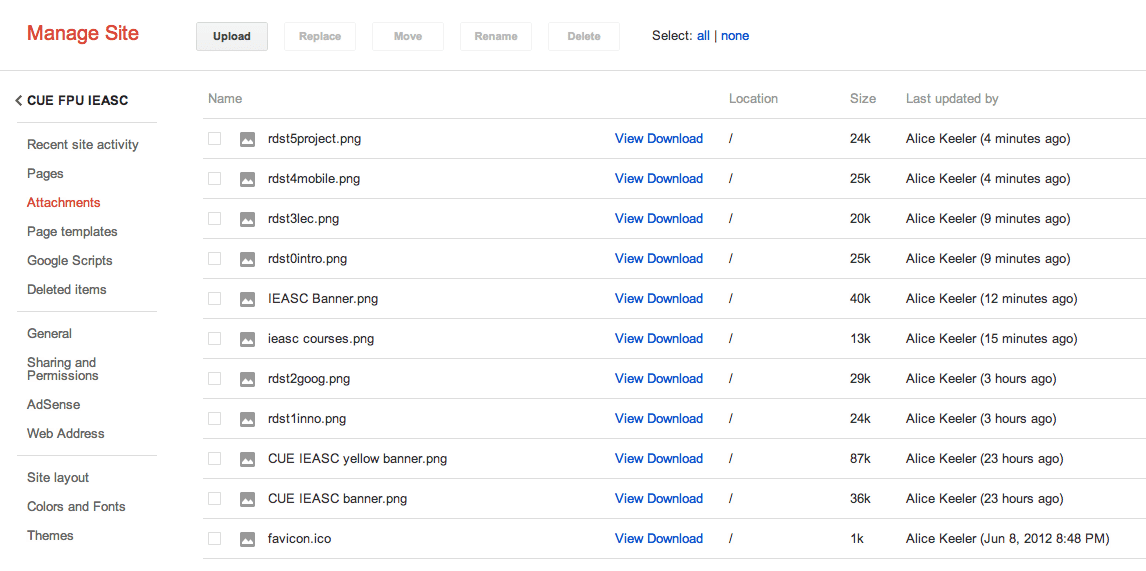
One way to get your images onto the internet is to use a site such as flickr or photobucket. Both are fine, but I want a faster way to upload images. My trick is to use a Google Site that I have. Google Sites allows me to upload images. Either I will insert the image into a page, attach the image at the bottom of a page or I will upload to the attachments on the management side.
Quick and dirty, after I sign in I click on the blue share button. This gets me into the management side of Google Sites.
Click on attachments on the left.
There is an upload option. Upload your image.
Click on view.
Right click on the image and copy the image URL.
With Google docs I can insert an image via URL, so I can just paste the URL right into the uploader. I can also do this with many other sites including WordPress. Today I am using Moodle with the chrome browser, thus my WYSIWYG toolbar is not working so I have to code everything in HTML. The HTML tag for images is <img src=”URL”> where you replace the URL with the URL of the image.
For example: <img src=”https://f8a852fb-a-62cb3a1a-s-sites.googlegroups.com/site/cuefpuieasc/rdst3lec.png?attachauth=ANoY7cq7vxrvxNXFoMVY9j-736Hw8oAddBi1sELOjk5ig0LmDwLFTiH_rpIJERiM6pnHUrZAcoGn8YcM9ZC7-_ZNCS7_qZHmtI3nypGHFXbZuAMa2EnOG992jhTIa9xYQqee_xNOpX8015ueX2JMCQbJQi-JNwxxzdOTyUvLblc52Vwh1xP4pwhHMX5xznLc7Q6E4oCLdgu4qSRT4QUwLBir9Ng861edww%3D%3D&attredirects=0″>
My other trick is I have a fake WordPress blog that I made just for uploading pictures. I use the WordPress app on my phone or iPad to insert images into a blog post. The WordPress app is quick and easy to use. I then use the same method of right clicking on the image to obtain the image URL.









1 thought on “Uploading Images to the Internet”
Quick and Dirty?! Very good post, thank you Alice. I favorited this on twitter so I can come back to it! Thanks!