





Google Forms Validation to Require Email
When you ask for an email address in Google Forms you want to make sure the person leaves a valid email address. Sometimes the responder will type other things into the answer box and you want to make sure they leave an actual email. You can easily check out if the responder’s email is legitimate at email verifier online as many suggest to use this tool.
Smart Interface
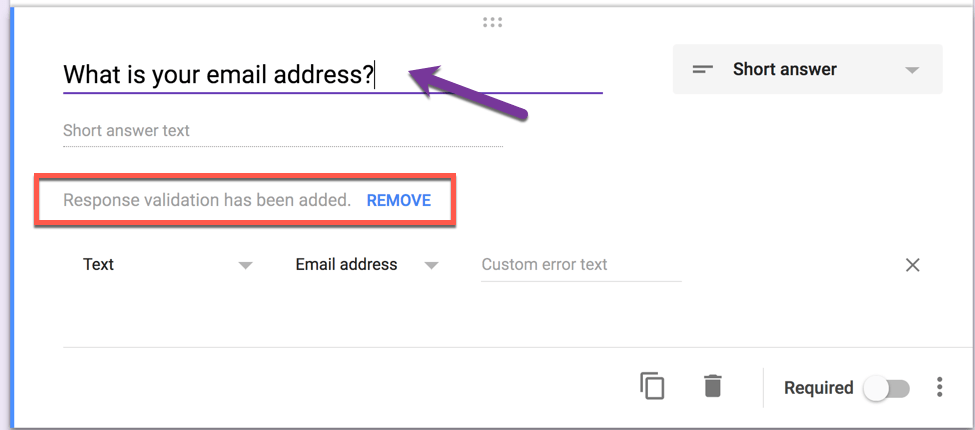
Google Forms now uses artificial intelligence (AI) to read your questions and predict what kinds of features you want to be enabled. If you type a question of “What is your email address?” Google Forms automatically adds a requirement that the response is an email address. So this part is easy. Simply put Email into the question and Google will create your validation for you!
Create Your Own Response Validation
To manually create Response validation, click on the 3 dots in the bottom right hand corner and choose “Response validation.”

This will allow you to create rules for what types of responses the responder can put into the answer box on the Google Form. Assuming you don’t need a numerical response, change from the default of looking for a “Number” to expect a “Text” response.

Contains
There are 2 ways to ask for an email address. The first is to choose “Email address” and the Google Form will expect that the responder submits a valid email address. However, what if you specifically want a valid email address from your school? I teach at Fresno State and all the student email is @mail.fresnostate.edu. It is not uncommon for a student to misspell the email and put @mial.fresnostate.edu or @mail.csufresno.edu both of which are wrong but would be read as valid email addresses.
To combat misspelling of the email address I instead choose “Contains.”
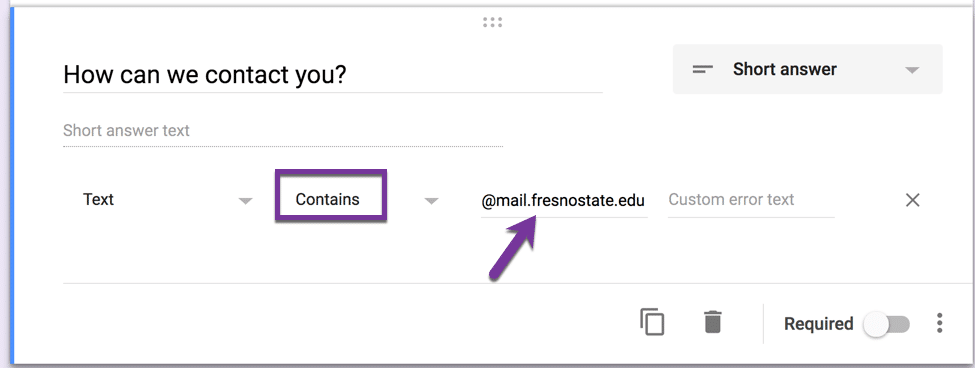
In the space to the right of the “Contains” choice you would write what should be part of the response. In my case I want @mail.fresnostate.edu to be part of their response. Thus mary@mail.fresnostate.edu and javier@mail.fresnostate.edu would both be acceptable responses to the question.








1 thought on “Google Forms: Require a Valid Email Address”
‘To combat misspelling of the email address I instead choose “Contains.” But in the automated ‘requires an emailaddress’ mode in Google forms, however, this ‘contains’ possibility does not occur?